
ProgeCAD 2021 Professional Features | New Commands & Enhancements
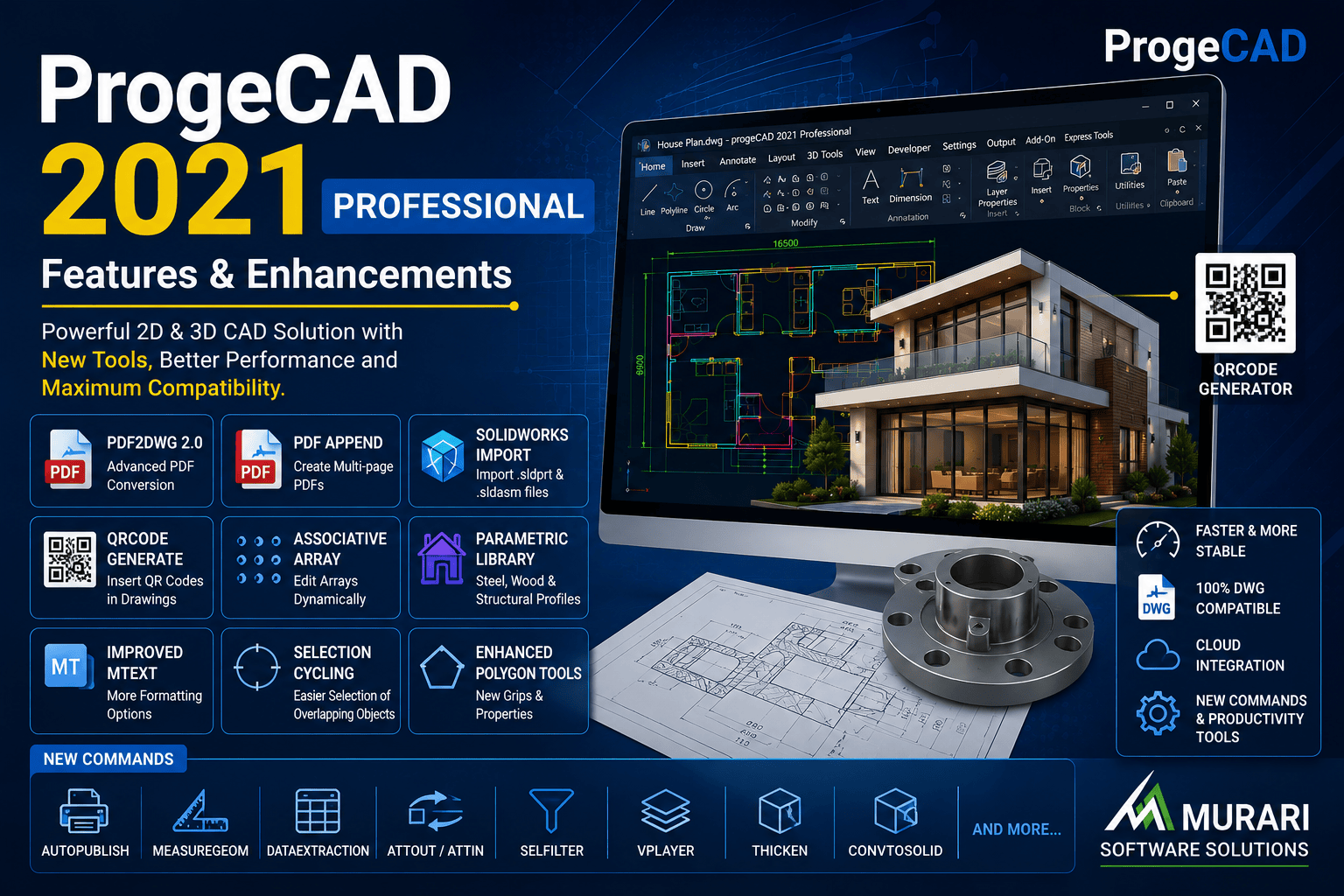
ProgeCAD 2021 Professional Features
ProgeCAD 2021 Professional introduced a wide range of productivity improvements, enhanced DWG compatibility, and powerful new CAD tools for architects, engineers, surveyors, mechanical designers, and construction professionals. Built on the latest IntelliCAD engine, ProgeCAD 2021 delivers faster performance, improved stability, and support for the latest DWG file formats while maintaining complete compatibility with AutoCAD® drawings.
Whether you are creating 2D drafting projects or advanced 3D models, ProgeCAD 2021 includes numerous enhancements designed to simplify everyday CAD workflows. From improved PDF conversion to SolidWorks file import and new parametric drawing tools, this release focuses on helping professionals complete projects faster and more accurately.
Top Features Introduced in ProgeCAD 2021
PDF2DWG 2.0 Conversion Engine
One of the biggest improvements in ProgeCAD 2021 is the redesigned PDF2DWG engine. Users can convert single or multiple PDF files into editable DWG drawings with improved recognition of text, line types, arcs, dashed lines, and layers. Batch conversion and multi-page PDF support significantly reduce manual drafting time.
SolidWorks File Import
ProgeCAD 2021 adds native support for importing SolidWorks® part (.SLDPRT) and assembly (.SLDASM) files. Mechanical engineers can now work with SolidWorks models directly inside ProgeCAD without requiring third-party conversion software.
QR Code Generator
The new QR Code command allows users to insert QR codes directly into engineering drawings. These QR codes can contain URLs, maintenance instructions, equipment information, serial numbers, contact details, or project documentation that can be scanned using any smartphone.
Enhanced PDF Publishing
The new Append PDF feature enables users to create multi-page PDF documents by combining several layouts or drawings into a single PDF file. This simplifies project documentation and drawing submissions.
Associative Arrays
Creating repetitive objects is much easier with Associative Arrays. Users can quickly modify rows, columns, spacing, rotation, and item count directly from the Properties panel without recreating the array.
Improved MTEXT Editor
The MTEXT editor now includes better formatting controls, background settings, annotative options, and the ability to paste text without formatting, making documentation cleaner and easier to manage.
Selection Cycling
Selecting overlapping objects becomes much easier using Selection Cycling. Instead of repeatedly clicking until the correct object is selected, users can cycle through overlapping entities and choose exactly what they need.
Advanced Parametric Libraries
ProgeCAD 2021 introduces new structural and mechanical libraries containing steel sections, timber profiles, channels, pipes, joists, tracks, and construction components. These libraries speed up drafting while maintaining dimensional accuracy.
New CAD Commands in ProgeCAD 2021
Several powerful commands were added to improve drafting efficiency, including:
- ARRAYPOLAR, ARRAYRECT and ARRAYEDIT
- AUTOPUBLISH for automatic PDF and DWF generation
- MEASUREGEOM for quick distance, angle and area calculations
- DATAEXTRACTION for creating schedules and Bills of Materials
- ATTOUT and ATTIN for importing and exporting block attributes
- SELFILTER for advanced object selection
- VPLAYER for viewport layer management
- THICKEN, CONVTOSURFACE, CONVTOMESH and CONVTOSOLID for advanced 3D editing
- POINTCLOUDBOUNDARY and POINTCLOUDPOINTSIZE for improved point cloud workflows
- CAMERA command for creating perspective views
Improved 3D Design Tools
ProgeCAD 2021 expands its 3D capabilities with enhanced section and elevation generation, photometric lighting controls, improved revision clouds, image clipping using polylines, and better polygon editing. These improvements help designers create more detailed and professional technical drawings.
Why Upgrade to ProgeCAD 2021?
Compared to previous versions, ProgeCAD 2021 offers faster performance, better DWG compatibility, enhanced PDF workflows, new 3D commands, improved productivity tools, and additional import/export capabilities. It is an excellent choice for professionals looking for an affordable AutoCAD® alternative without sacrificing essential CAD functionality.
Download ProgeCAD 2021
If you would like to evaluate these features, you can download the fully functional ProgeCAD 2021 Professional Trial . The trial allows you to explore all features before purchasing a license. Existing customers can also upgrade to the latest version for additional enhancements and long-term compatibility with modern DWG files.
Murari Software Solutions has been an authorized ProgeCAD distributor in India since 2006, providing genuine licenses, technical support, installation assistance, and competitive pricing for individuals, educational institutions, and businesses.