
ProgeCAD 2026 vs 2027: What Has Changed?
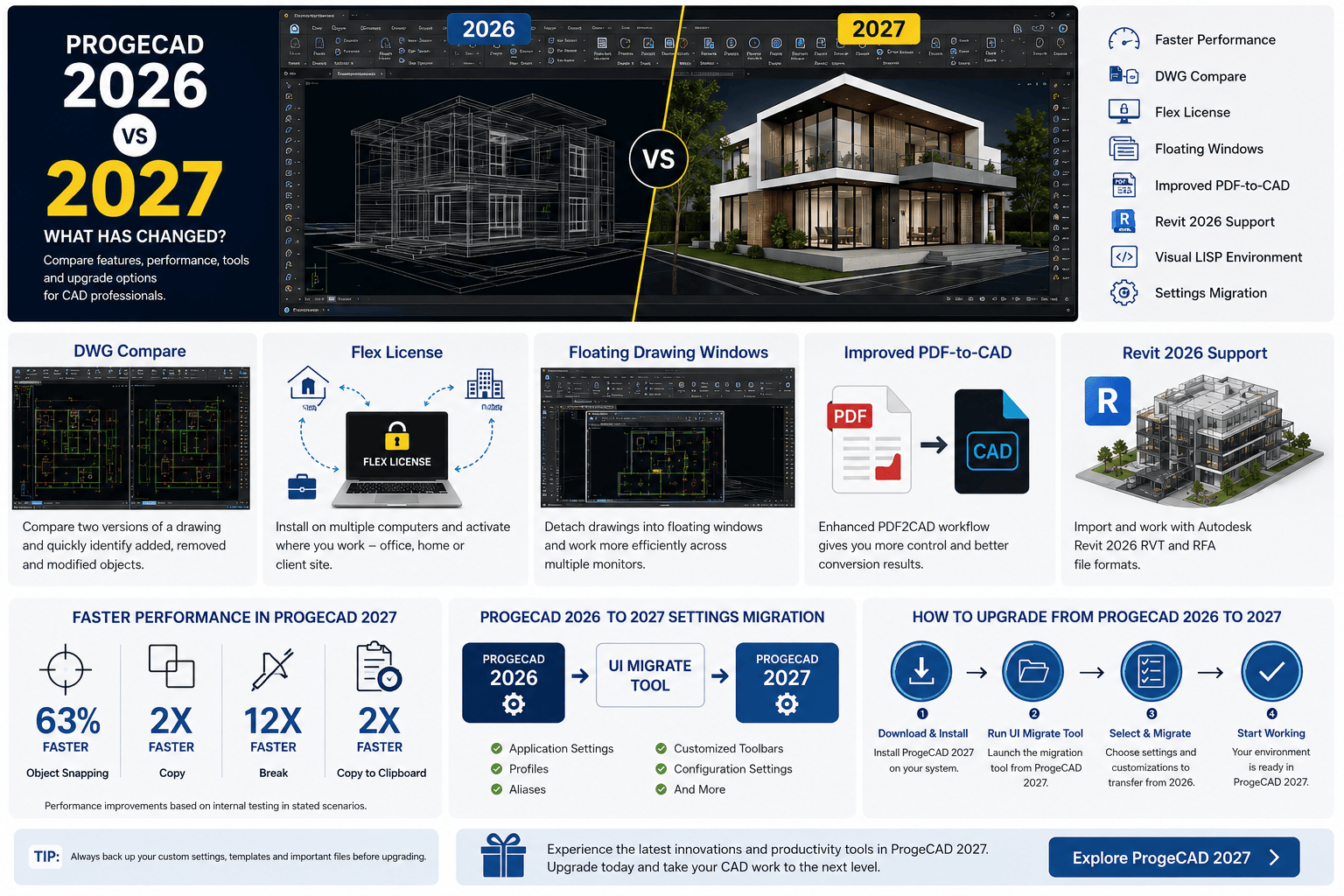
ProgeCAD 2026 vs 2027: What Has Changed?
If you are searching for ProgeCAD 2026, you may already be using the software or comparing an existing installation with the latest release. ProgeCAD 2027 is now available, bringing a new IntelliCAD 14.1 engine, performance improvements, DWG Compare, Flex Licensing, improved PDF-to-CAD tools, Revit 2026 support and several new drafting and productivity features.
This guide compares ProgeCAD 2026 vs 2027 and explains what changed, what is new in 2027, and whether upgrading makes sense for existing ProgeCAD 2026 users.
ProgeCAD 2026 vs 2027 at a Glance
ProgeCAD 2026 introduced important performance improvements with the IntelliCAD 13.1 engine. ProgeCAD 2027 builds on that foundation with the newer IntelliCAD 14.1 engine and adds several new tools for drafting, revision control, licensing, BIM, GIS and everyday CAD workflows.
| Feature | ProgeCAD 2026 | ProgeCAD 2027 |
|---|---|---|
| IntelliCAD Engine | IntelliCAD 13.1 | IntelliCAD 14.1 |
| Drawing Performance | Improved | Further optimized |
| DWG Compare | Not available | Available |
| Flex License | Not available | Available |
| Floating Drawing Windows | Not available | Available |
| PDF-to-CAD Workflow | Available | Enhanced |
| Revit Compatibility | Available | Revit 2026 support |
| GIS Tools | Available | Enhanced |
| UI Migration | Not applicable | Migration from ProgeCAD 2026 |
| Visual LISP | Improved LISP performance | New Visual LISP environment |
What Was New in ProgeCAD 2026?
ProgeCAD 2026 was a significant release focused strongly on performance and everyday CAD productivity. It introduced the IntelliCAD 13.1 engine along with improvements to drawing updates, 3D-solid opening, regeneration and several common drafting operations.
Some of the important ProgeCAD 2026 improvements included:
- New IntelliCAD 13.1 engine
- Faster drawing updates
- Faster opening of drawings containing 3D solids
- Improved drawing regeneration
- Faster Hatch and Boundary operations
- Improved performance when working with large drawings
- Improved AI Translator performance
- Improved LISP performance
- Faster MOVE, COPY and PASTE operations
- Improved BEDIT preview performance
These improvements made ProgeCAD 2026 a useful release for professionals working with everyday 2D and 3D CAD projects. However, ProgeCAD 2027 introduces another set of major improvements on top of the 2026 platform.
What Is New in ProgeCAD 2027?
ProgeCAD 2027 introduces the IntelliCAD 14.1 engine and focuses on faster performance, flexible licensing, drawing comparison, improved interoperability and new productivity tools.
The most important changes include:
- New IntelliCAD 14.1 engine
- Up to 63% faster object snapping in stated scenarios
- Faster Copy and Break operations
- New Flex License
- New DWG Compare command
- Floating Drawing Windows
- Improved PDF-to-CAD workflow
- ESRI ArcGIS basemap support
- Autodesk Revit 2026 compatibility
- New 2D isometric drafting environment
- New Visual LISP environment
- Improved AEC tools
- New GIS and terrain tools
- Improved raster editing tools
1. Faster CAD Performance in ProgeCAD 2027
Performance is one of the biggest areas of improvement in ProgeCAD 2027. The new IntelliCAD 14.1 engine includes changes to snapping, memory management and several everyday CAD operations.
According to the official ProgeCAD feature information, users can see improvements including up to 63% faster snapping, up to 2 times faster Copy operations, up to 12 times faster Break operations and faster Copy to Clipboard performance in stated scenarios.
These improvements are particularly useful for users working with large or complex drawings where repeated editing and selection operations can affect productivity.
2. DWG Compare Makes Drawing Revision Checks Easier
One of the notable new tools in ProgeCAD 2027 is the COMPARE command.
It allows users to compare two DWG drawing versions and identify added, removed and modified objects. This can be useful when checking drawing revisions, reviewing design changes or verifying updates before sending a drawing to a client or project team.
For professionals who regularly work with multiple revisions of the same drawing, DWG Compare can reduce the time required to manually identify changes.
3. Flex License for Multiple Work Locations
ProgeCAD 2027 introduces the Flex License for users who work across multiple computers and locations.
The license can be installed on multiple computers and activated on the computer where the user is currently working. The active license can then be transferred when the user moves to another workstation.
- Use ProgeCAD across office and home computers
- Work from client locations
- Move the active license between computers
- Work offline after activation
This can be especially useful for professionals who do not work from a single fixed workstation.
4. Floating Drawing Windows for Multi-Monitor Workflows
ProgeCAD 2027 introduces Floating Drawing Windows, allowing drawings to be moved outside the main application window.
This can make multi-monitor workflows more convenient. For example, users can keep a reference drawing on one monitor while editing another drawing on a second monitor.
5. Improved PDF-to-CAD Workflow
PDF drawings are common in architecture, engineering, construction and manufacturing workflows. ProgeCAD 2027 improves the PDF-to-CAD workflow with an updated PDF2CAD process.
This can help users convert PDF drawing information into editable CAD content and reduce the need to recreate drawing information manually.
6. Revit 2026 Compatibility
For professionals working between CAD and BIM environments, ProgeCAD 2027 adds support for Autodesk Revit 2026 RVT and RFA file formats through its BIM Import capabilities.
This makes the 2027 release particularly relevant to users who need to work with newer Revit-based project information alongside their CAD drawings.
7. Improved GIS and Mapping Tools
ProgeCAD 2027 also expands its GIS and terrain capabilities.
New and improved tools include ESRI ArcGIS basemap support, terrain analysis features, slope-related tools and improved GIS workflows.
These capabilities can be useful for surveying, civil engineering, infrastructure and mapping-related projects.
8. New Visual LISP Environment
For advanced CAD users and developers, ProgeCAD 2027 introduces a new Visual LISP environment.
The new VLISP environment provides tools for developing and debugging LISP applications. ProgeCAD 2027 also supports AutoCAD®-compatible compiled LISP applications such as VLX and FAS files.
This can make it easier for organizations with existing LISP-based workflows to continue using custom CAD automation.
9. ProgeCAD 2026 to 2027 Settings Migration
One concern when upgrading CAD software is losing customized settings, aliases, profiles and toolbars.
ProgeCAD 2027 addresses this with a new UI Migrate Tool designed to transfer settings and customizations from ProgeCAD 2026.
The migration process can transfer items such as:
- Application settings
- Saved profiles
- Command aliases
- Customized toolbars
- Selected configuration settings
This means users moving from ProgeCAD 2026 to 2027 do not necessarily have to recreate their working environment manually.
Should ProgeCAD 2026 Users Upgrade to 2027?
There is no single answer for every user. The decision depends on your workflow, project requirements and the features you need.
Upgrading to ProgeCAD 2027 may make sense if you:
- Work with large or complex CAD drawings
- Need faster everyday drafting operations
- Regularly compare different DWG revisions
- Work between office, home and client locations
- Need the new Flex License
- Work with Revit 2026 files
- Use GIS or terrain-related workflows
- Depend on advanced LISP automation
- Want access to the latest ProgeCAD tools
Continuing with ProgeCAD 2026 may make sense if you:
- Have a stable existing production environment
- Do not currently need the new 2027 features
- Have project requirements that depend on a tested 2026 setup
- Need additional time to test and deploy a new CAD version
For business environments, it is generally sensible to test a new CAD version with representative drawings and workflows before deploying it across an entire organization.
ProgeCAD 2026 vs 2027: Which Version Should You Choose?
| Your Situation | Recommended Approach |
|---|---|
| You are buying ProgeCAD for the first time | Evaluate ProgeCAD 2027 |
| You currently use ProgeCAD 2026 | Evaluate the upgrade to 2027 |
| Your 2026 workflow is stable and meets your needs | Continue using 2026 while evaluating 2027 |
| You need to compare DWG revisions | ProgeCAD 2027 |
| You work across multiple computers | ProgeCAD 2027 with Flex License |
| You work with Revit 2026 files | ProgeCAD 2027 |
| You need advanced GIS and terrain tools | Evaluate ProgeCAD 2027 |
Can ProgeCAD 2026 Users Move to ProgeCAD 2027?
Yes. ProgeCAD 2027 includes a UI Migrate Tool specifically designed to help users move their settings and customizations from ProgeCAD 2026.
This can simplify the transition for users who have customized their CAD environment with profiles, aliases, toolbars and other settings.
Before upgrading a production workstation, however, it is good practice to back up important CAD settings and test your regular drawings and custom applications.
Does ProgeCAD 2027 Replace ProgeCAD 2026?
ProgeCAD 2027 is the newer major release, but that does not mean every existing ProgeCAD 2026 user must immediately upgrade.
The best approach depends on your projects, compatibility requirements, customizations and the features that matter to your team.
For new buyers, ProgeCAD 2027 is the release to evaluate. Existing ProgeCAD 2026 users can compare the new features and decide whether the upgrade provides enough value for their workflow.
What Should You Check Before Upgrading?
- Test your most frequently used DWG files.
- Check custom LISP applications.
- Test third-party CAD plugins.
- Review your templates and blocks.
- Check plot styles and printing workflows.
- Back up customized settings.
- Test Revit and BIM workflows if applicable.
- Check your organization's licensing requirements.
- Test the new version before deploying it to every workstation.
ProgeCAD 2026 vs 2027: The Bottom Line
ProgeCAD 2026 remains an important version for users who are working with an existing installation, but ProgeCAD 2027 takes the platform further with a newer IntelliCAD engine, improved performance, DWG Compare, Flex Licensing, enhanced PDF workflows, Revit 2026 compatibility and additional CAD, GIS and automation tools.
If you are already using ProgeCAD 2026, the decision to upgrade should be based on the features your projects actually require. If you are purchasing ProgeCAD for the first time, evaluating the latest ProgeCAD 2027 release is the more relevant starting point.
The good news for existing 2026 users is that ProgeCAD 2027 includes a migration tool designed to help transfer important settings and customizations from the previous version.
Frequently Asked Questions
What is the difference between ProgeCAD 2026 and 2027?
ProgeCAD 2027 introduces the IntelliCAD 14.1 engine, improved performance, DWG Compare, Flex License, Floating Drawing Windows, enhanced PDF-to-CAD tools, Revit 2026 support, improved GIS capabilities and a new Visual LISP environment.
Is ProgeCAD 2026 still relevant?
ProgeCAD 2026 can remain relevant for users who already have a stable installation and do not require the newer features in ProgeCAD 2027. New buyers should evaluate the latest release and their specific requirements.
Should I upgrade from ProgeCAD 2026 to 2027?
If you need features such as DWG Compare, Flex Licensing, improved performance, Revit 2026 support or newer CAD and GIS tools, upgrading to ProgeCAD 2027 may be worthwhile. Existing users should test their workflows before deployment.
Can I migrate my ProgeCAD 2026 settings to 2027?
Yes. ProgeCAD 2027 includes a UI Migrate Tool that can transfer settings, profiles, aliases, customized toolbars and selected configurations from ProgeCAD 2026.
What engine does ProgeCAD 2027 use?
ProgeCAD 2027 is built on the IntelliCAD 14.1 engine.
Does ProgeCAD 2027 support Revit 2026?
Yes. ProgeCAD 2027 BIM Import supports Autodesk Revit 2026 RVT and RFA file formats.
What is DWG Compare in ProgeCAD 2027?
DWG Compare is a new comparison feature that helps users identify added, removed and modified objects between two DWG drawing versions.
What is the ProgeCAD 2027 Flex License?
The Flex License allows users to install ProgeCAD on multiple computers and transfer the active license between computers when needed. It is designed for professionals who work from different locations.
Explore More ProgeCAD Resources
- Explore ProgeCAD 2027 Features
- Check ProgeCAD Pricing and License Options
- Download the ProgeCAD Trial
- Read More ProgeCAD Articles
About ProgeCAD India: ProgeCAD India provides ProgeCAD licensing, upgrades, technical support and CAD solutions for professionals, businesses and organizations.
Editorial note: Product features and licensing options can change. Please verify the latest product information before making a purchasing or upgrade decision.