
ProgeCAD Download Guide: How to Download, Install & Activate ProgeCAD Professional
ProgeCAD Download: 2027 Free Trial & Installation Guide
Looking for a reliable ProgeCAD download for Windows? Whether you want to try the latest ProgeCAD 2027 or need an older version for an existing CAD environment, this guide explains where to download ProgeCAD, how the download process works, and what to do after installation.
ProgeCAD 2027 is available as a full-featured 30-day free trial. You can request the download from the dedicated ProgeCAD India download page, submit the required details, receive the download information and install the software on your Windows computer.
This guide walks you through the complete process — from finding the ProgeCAD download page to opening the software for the first time.
Download ProgeCAD 2027 Free Trial
Try the latest ProgeCAD release with a full-featured 30-day free trial and evaluate it using your own CAD drawings.
Download ProgeCAD 2027What Is ProgeCAD?
ProgeCAD is professional CAD software for 2D drafting and 3D modelling. It is designed for engineers, architects, designers, manufacturers, contractors and other CAD professionals who work with technical drawings and design projects.
ProgeCAD works with DWG and DXF files and provides tools for drafting, modelling, documentation and other common CAD workflows.
DWG & DXF Support
Work with DWG and DXF drawings for common CAD drafting and documentation workflows.
2D & 3D CAD
Create professional 2D drawings and 3D models for different design requirements.
Flexible Licensing
Choose a licensing option that matches your individual, professional or business CAD requirements.
How to Download ProgeCAD 2027
If you are searching for the latest ProgeCAD download, the dedicated ProgeCAD 2027 download page provides access to the current release and its 30-day full-featured trial.
The download process is simple. You first visit the download page, enter the requested information and submit the form. The download page then provides the available download options.
Step 1: Visit the ProgeCAD 2027 Download Page
Start by visiting the dedicated ProgeCAD 2027 Download Page.
This page is specifically designed for users who want to download and evaluate the latest version of ProgeCAD.
Step 2: Complete the Download Form
On the download page, enter the requested details in the download form. The form includes fields for your name, email address and phone number.
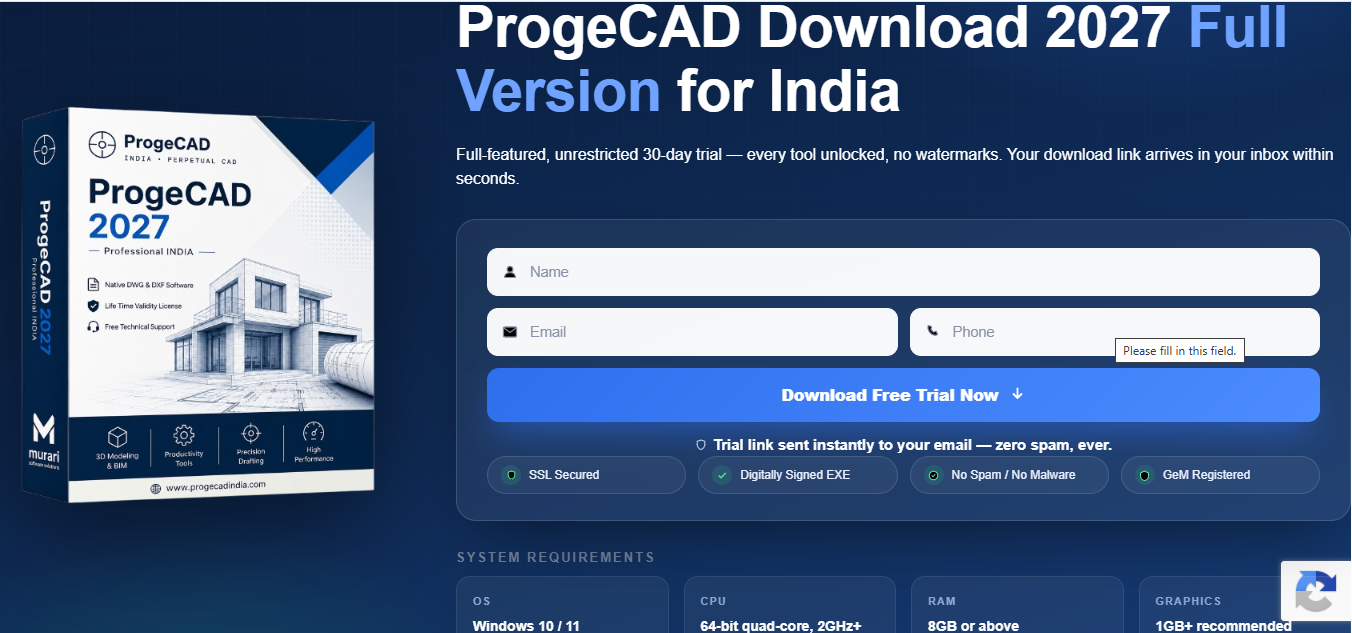
After entering the required information, review your details and select Download Free Trial Now to submit the request.
Step 3: Submit Your Details
After submitting the download form, follow the instructions displayed on the download page. The page will provide the available ProgeCAD 2027 download links.
Make sure you use the download option that matches your licensing or installation requirement.
Step 4: Choose Your ProgeCAD Download Option
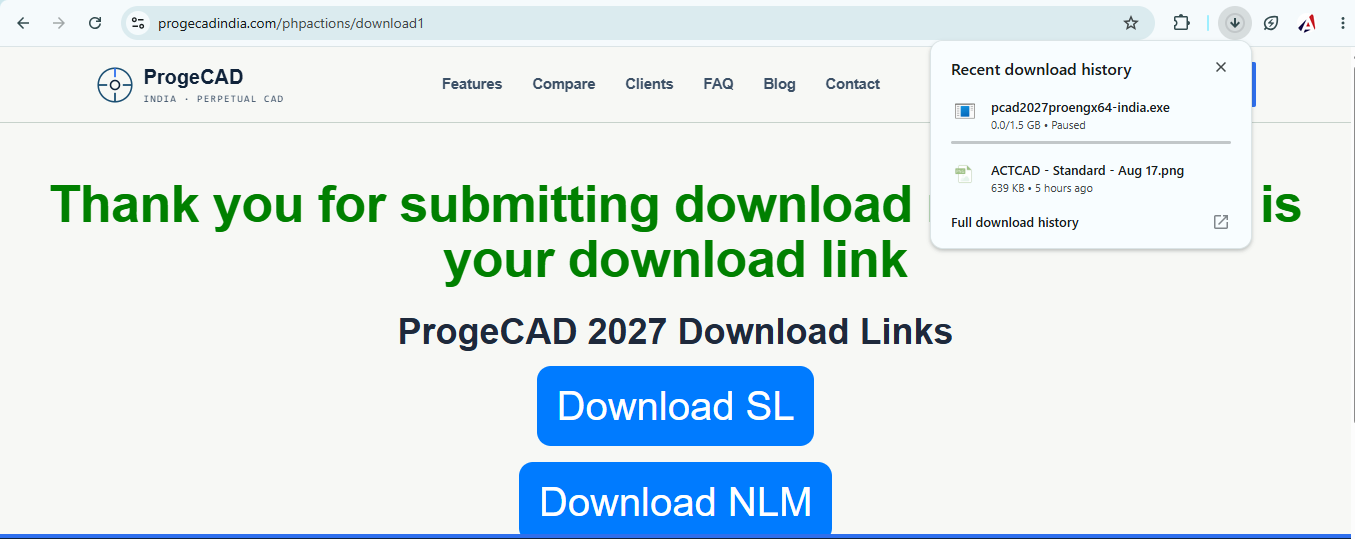
After submitting the form, the download page provides the available ProgeCAD 2027 download links. In the current download process, users may see options such as Download SL and Download NLM.
Step 5: Download the ProgeCAD Installer
After selecting the appropriate download option, download the ProgeCAD installer to your Windows computer.
Wait for the download to finish before starting the installation process. Save the installer in an easily accessible location so you can find it when you are ready to install ProgeCAD.
How to Install ProgeCAD 2027
Once the ProgeCAD download is complete, you can begin the installation process.
- Locate the downloaded ProgeCAD installer.
- Open the installer.
- Follow the installation instructions displayed on the screen.
- Choose the required installation options.
- Allow the installation to complete.
- Launch ProgeCAD after installation.
Step 6: Open ProgeCAD After Installation
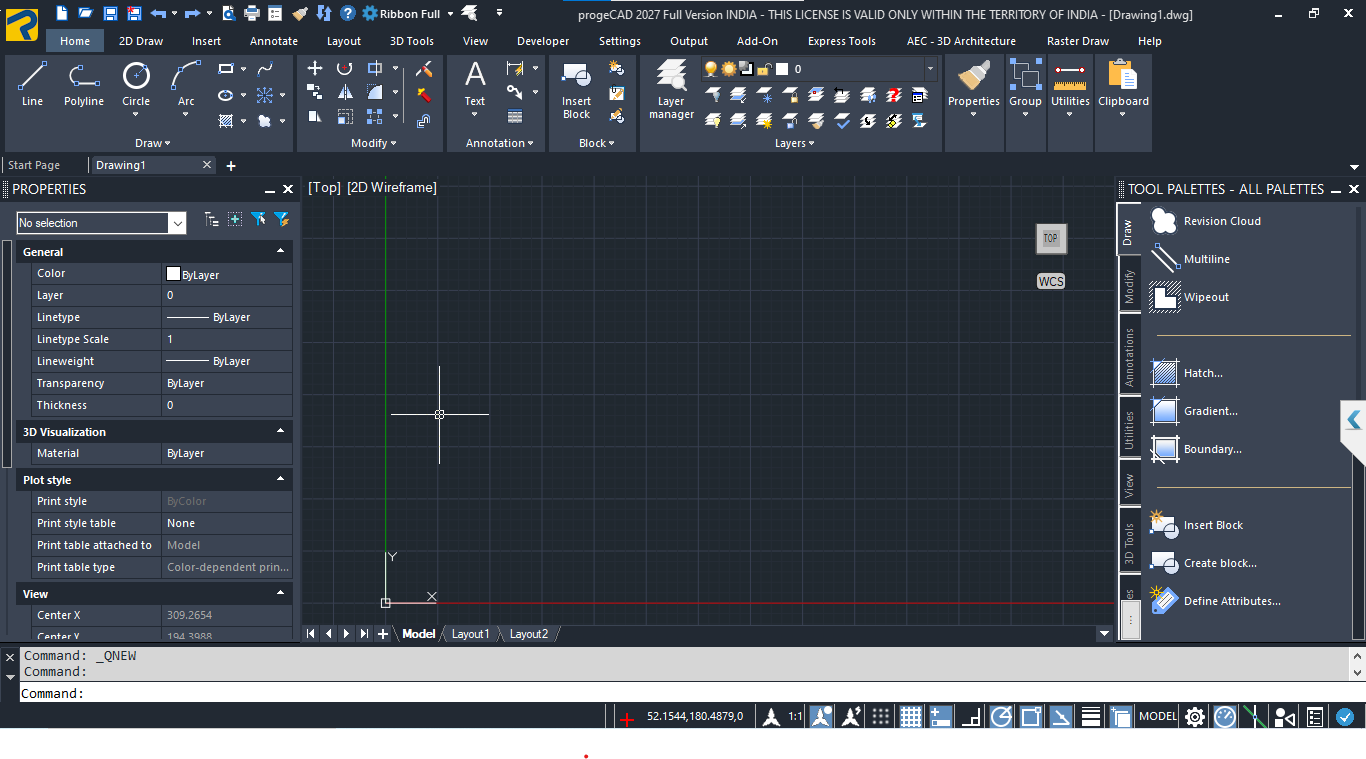
After the installation has finished, launch ProgeCAD from your Windows computer. The application will open and display the ProgeCAD working environment.
Getting Started With the ProgeCAD Interface
If you are opening ProgeCAD for the first time, take a few minutes to become familiar with the interface.
- Drawing area: The main workspace where you create and edit CAD drawings.
- Toolbars and panels: Provide access to frequently used drafting and editing tools.
- Command line: Allows you to enter CAD commands and interact with the software.
- Properties and settings: Help you view and modify drawing and object information.
- Model and layout areas: Allow you to work with drawing models and layouts for documentation.
Test ProgeCAD With Your Own Drawings
After installing ProgeCAD, the best way to evaluate the software is to use drawings from your normal CAD workflow.
During the trial period, consider testing:
- DWG files,DXF files,Layers,Blocks,Dimensions,Layouts,Printing and plotting,PDF-related workflows,2D drafting tools,3D modelling tools.
What's New in ProgeCAD 2027?
ProgeCAD 2027 includes a number of improvements designed to enhance CAD drafting and design workflows.
- IntelliCAD 14.1 engine
- Faster object snapping
- Flex License functionality
See the complete feature information on the ProgeCAD 2027 Features page.
Try ProgeCAD 2027
Download the 30-day free trial and evaluate ProgeCAD using your own CAD drawings.
Download ProgeCAD 2027ProgeCAD Older Versions Download
Some users may need an earlier version of ProgeCAD because their organization uses an existing CAD environment, established workflows or specific project requirements.
If you need an older release, visit the general ProgeCAD India Download page and check which previous versions are currently available.
Download Older VersionsHow to Download Older Versions of ProgeCAD
- Visit the ProgeCAD India Download Page.
- Find the ProgeCAD version you require.
- Select the corresponding download option.
- Download the installer for that version.
- Follow the installation instructions provided for the selected release.
ProgeCAD 2027 System Requirements
Before starting the ProgeCAD 2027 download, make sure your Windows computer meets the following minimum system requirements:
| System Requirement | Minimum Requirement |
|---|---|
| Operating System | Windows 10 / 11 |
| Processor | 2 GHz or faster, 64-bit |
| Memory | 4 GB RAM minimum |
| Storage | 10 GB free disk space |
| Graphics | OpenGL 2.0 or higher |
Can ProgeCAD Open AutoCAD®® DWG Files?
Yes. ProgeCAD works with DWG and DXF files and is designed for professional CAD drafting and design workflows.
If you are moving from another CAD application, testing your existing DWG drawings during the trial is a practical way to evaluate compatibility with your workflow.
Frequently Asked Questions About ProgeCAD Download
Where can I download ProgeCAD?
You can download the latest ProgeCAD 2027 free trial from the dedicated 2027 download page. Previous versions are available through the ProgeCAD India download page.
Is the ProgeCAD 2027 download free?
ProgeCAD 2027 is available as a full-featured 30-day free trial. After the trial period, users can choose an appropriate commercial license.
How do I download ProgeCAD 2027?
Visit the dedicated ProgeCAD 2027 download page, complete the requested form and follow the download instructions provided by ProgeCAD India.
What happens after I submit the download form?
After submitting the required information, the download page provides the available ProgeCAD 2027 download options. Select the appropriate option and continue with the download.
Can I download older versions of ProgeCAD?
Yes. Previous ProgeCAD releases are available through the ProgeCAD India download page, subject to the versions currently provided there.
Does ProgeCAD support DWG files?
Yes. ProgeCAD works with DWG and DXF files and is designed for professional CAD drafting and design workflows.
Is ProgeCAD available for Windows?
Yes. ProgeCAD Professional is available for Windows. Check the current system requirements for the specific version you want to install.
Can I test ProgeCAD with my existing drawings?
Yes. During the trial, you can evaluate the software using your own CAD drawings and test the features and workflows that are important to your work.
Download ProgeCAD 2027 Today
Start with the 30-day full-featured trial and evaluate ProgeCAD with your own CAD projects.
Download ProgeCAD 2027 Find Older Versions