
ProgeCAD 2027: progeCAD Free Version: Is It Really Free?
Is There a progeCAD Free Version? Free Trial and Licensing Explained
If you are searching for a progeCAD free version, you probably want to know whether you can use professional CAD software without paying for a licence. progeCAD is commercial CAD software, but ProgeCAD India provides a free trial so you can evaluate the software before deciding whether to buy it. This guide explains the free trial, available features, licensing options, and how to download progeCAD.
It is important to understand the difference between a free trial and a permanently free version. A free trial allows you to evaluate the software for a limited period, while a commercial licence provides continued use under the applicable licence terms.
Is There a Completely Free progeCAD Version?
ProgeCAD India offers a free trial of progeCAD so users can explore the software before purchasing a licence. However, the free trial should not be confused with a permanently free full version.
If you are looking for a professional CAD application that you can use indefinitely without purchasing a licence, it is important to check the current licensing conditions. progeCAD is commercial software, and continued licensed use requires an appropriate licence.
The free trial gives architects, engineers, designers, and CAD professionals an opportunity to test the software and determine whether it meets their project requirements.
What Is Included in the progeCAD Free Trial?
The progeCAD free trial is designed to help users evaluate the software before making a purchasing decision. You can explore its CAD environment and test the tools that are relevant to your everyday drafting and design work.
Depending on the edition and trial version, you can evaluate workflows such as:
- 2D drafting and drawing creation
- 3D modelling tools
- Opening and editing DWG drawings
- Layers, blocks, dimensions, and annotations
- Layouts, viewports, printing, and plotting
- PDF-to-DWG workflows and supported file tools
- CAD commands and shortcuts used in regular drafting work
Feature availability may depend on the product edition and version. Check the official product information to confirm that the tools you need are included.
How to Download the Official progeCAD Free Trial
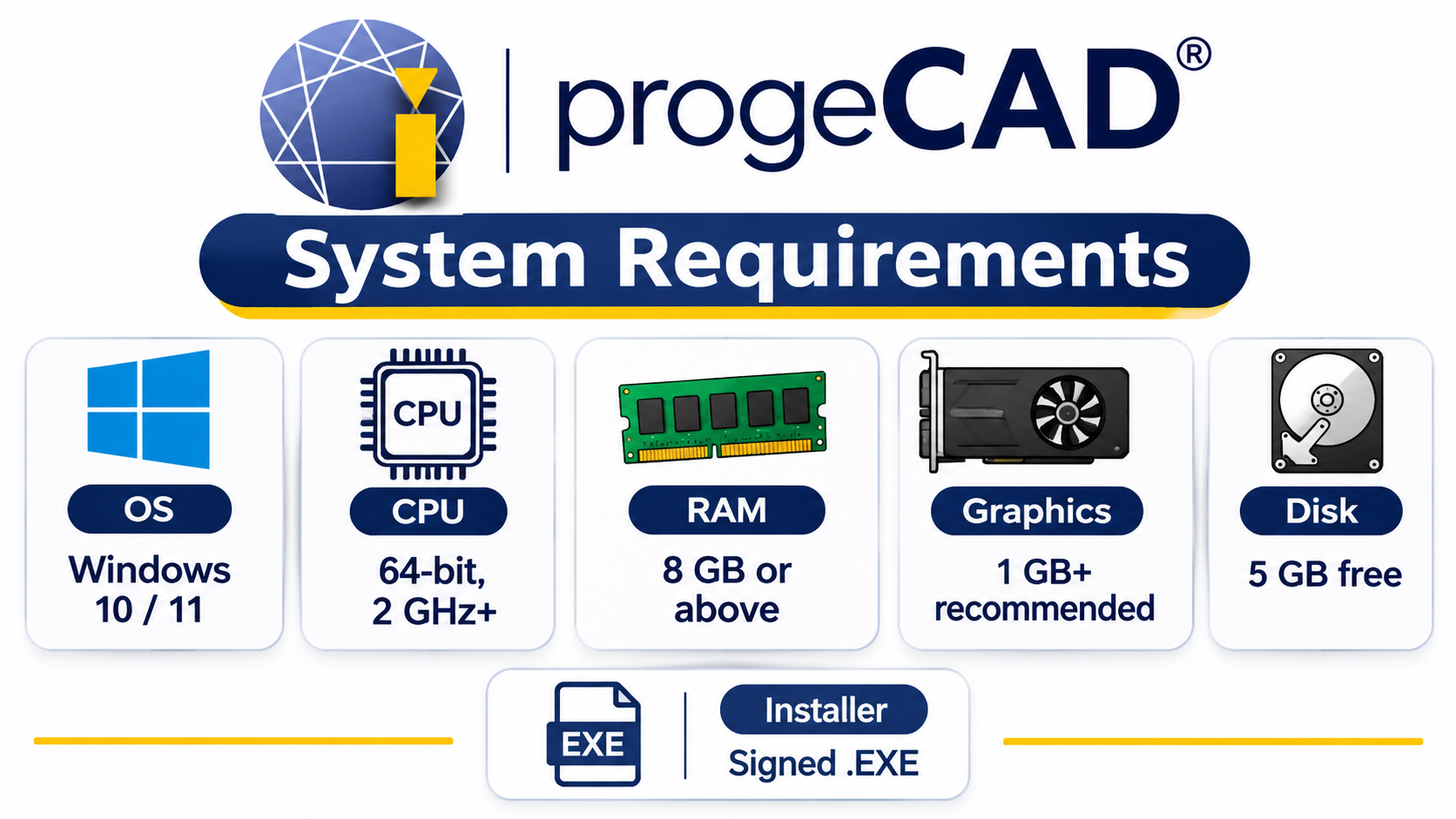
If you want to try progeCAD, download it through the official ProgeCAD India website. Using the official download page helps you access the correct trial information and installation instructions.
- Visit the ProgeCAD India free trial page.
- Read the available trial details and conditions.
- Submit the required contact information to request the trial.
- Follow the download and installation instructions provided.
- Launch progeCAD and test it using your own CAD drawings.
Before installing the software, check the latest system requirements and trial conditions on the official website.
What Should You Test During the progeCAD Free Trial?
Simply opening the software is not enough to determine whether it is suitable for your work. Use the evaluation period to test real project files and the commands you use regularly.
1. Open Existing DWG Drawings
Start by opening some of your existing DWG files. Check whether the drawing geometry, layers, blocks, text styles, dimensions, layouts, and external references appear as expected.
2. Create and Edit a Sample Drawing
Create a new drawing and try common drafting commands such as lines, circles, arcs, polylines, hatches, and dimensions. Also test editing operations such as move, copy, trim, extend, and offset.
3. Explore 2D Drafting and 3D Modelling
If your work involves 2D drafting, evaluate the drawing, annotation, and layer-management tools. If you work with 3D designs, test the modelling features relevant to your projects.
4. Check Printing and PDF Workflows
Test page setups, paper sizes, plot styles, lineweights, and PDF output. Review the final output to make sure it meets your drawing documentation requirements.
5. Evaluate Your Everyday CAD Workflow
If you work with custom commands, templates, or third-party applications, test them during the trial. This helps you understand whether progeCAD fits into your existing design process.
progeCAD Free Trial vs. Purchased Licence
The free trial and purchased licence serve different purposes. The trial is intended for software evaluation, while a purchased licence provides continued use according to the selected licence terms.
| Free Trial | Purchased Licence |
|---|---|
| Allows users to evaluate the software. | Provides licensed use under the purchased edition and terms. |
| Useful for testing CAD tools and workflows. | Suitable for ongoing professional work. |
| Available for a limited evaluation period. | Licence duration and rights depend on the selected licence. |
| Does not replace a commercial licence. | Provides continued licensed use. |
Does progeCAD Offer a Subscription or One-Time Licence?
ProgeCAD India offers perpetual licensing options. A perpetual licence allows continued use of the licensed version according to its terms, rather than requiring an annual subscription simply to keep using that version.
Optional upgrades to future versions may involve additional fees. Before purchasing, confirm the licence type, edition, upgrade rights, support terms, and current pricing.
For more information, visit the ProgeCAD India purchasing page.
What Happens When the progeCAD Free Trial Ends?
When the evaluation period ends, the trial is no longer a basis for continued full-featured commercial use. If you find that progeCAD meets your requirements, you can contact ProgeCAD India to explore the available licence options.
You are not required to purchase the software simply because you tried the free trial. The purpose of the evaluation is to help you make an informed decision before investing in a CAD application.
Who Should Try progeCAD?
The progeCAD free trial can be useful for different professionals who want to evaluate a professional CAD environment before purchasing.
- Architects: Test architectural plans, sections, elevations, dimensions, and layouts.
- Civil Engineers: Evaluate engineering drawings, annotations, layers, and plotting workflows.
- Mechanical Designers: Explore drafting and modelling tools relevant to mechanical design.
- Interior Designers: Work with floor plans, furniture layouts, dimensions, and presentation drawings.
- CAD Teams: Test project files, templates, drawing standards, and team workflows.
- Students and New Users: Become familiar with a professional CAD environment during the evaluation period.

Questions to Ask Before Buying a progeCAD Licence
Before purchasing a licence, review your experience with the trial and consider the following questions:
- Did your existing DWG drawings open and display as expected?
- Could you complete your regular drafting and editing tasks?
- Were dimensions, fonts, blocks, and hatches handled as required?
- Did printing and plotting produce the output you needed?
- Do your essential custom commands and connected tools work?
- Does the selected licence suit the number of users in your organisation?
- Have you confirmed the current pricing, support, and upgrade options?
Frequently Asked Questions About the progeCAD Free Version
Is progeCAD free?
progeCAD is commercial CAD software. ProgeCAD India offers a free trial for evaluation, while continued licensed use of the full product requires purchasing an appropriate licence.
Is there a permanently free progeCAD version?
ProgeCAD India's published offering describes a free trial rather than a permanently free full-featured edition. Check the official website for the latest editions and offers.
How long is the progeCAD free trial?
The trial duration is stated on the official page where you request the download. Check the current terms on that page before applying, as trial offers may change.
Where can I download progeCAD?
You can request the trial through the official ProgeCAD India free trial page.
Can I open my existing DWG files during the trial?
The trial is intended to help users evaluate progeCAD with their own CAD workflows. Open representative DWG files and inspect the drawing elements that matter to your projects.
Does progeCAD offer a perpetual licence?
ProgeCAD India lists perpetual licensing options. Confirm the exact licence rights, edition, upgrade terms, and price before purchasing.
Do I have to purchase progeCAD after trying it?
No. The trial is an evaluation opportunity. You can decide whether the software meets your needs before choosing whether to purchase a licence.
Try progeCAD Before You Buy
If you are searching for a progeCAD free version, the official free trial is a practical way to evaluate the software before purchasing. Test your own DWG drawings, explore the drafting and modelling tools relevant to your work, and check whether your everyday CAD workflow is supported.
Request the progeCAD free trial from ProgeCAD India and review the current trial conditions. If the software meets your requirements, explore the available licence options.
Note: Trial duration, features, pricing, and licence conditions may change. Always confirm the latest details on the official ProgeCAD India website before downloading or purchasing.