
ProgeCAD Menu Customization Guide | Add Custom Menus & Toolbars
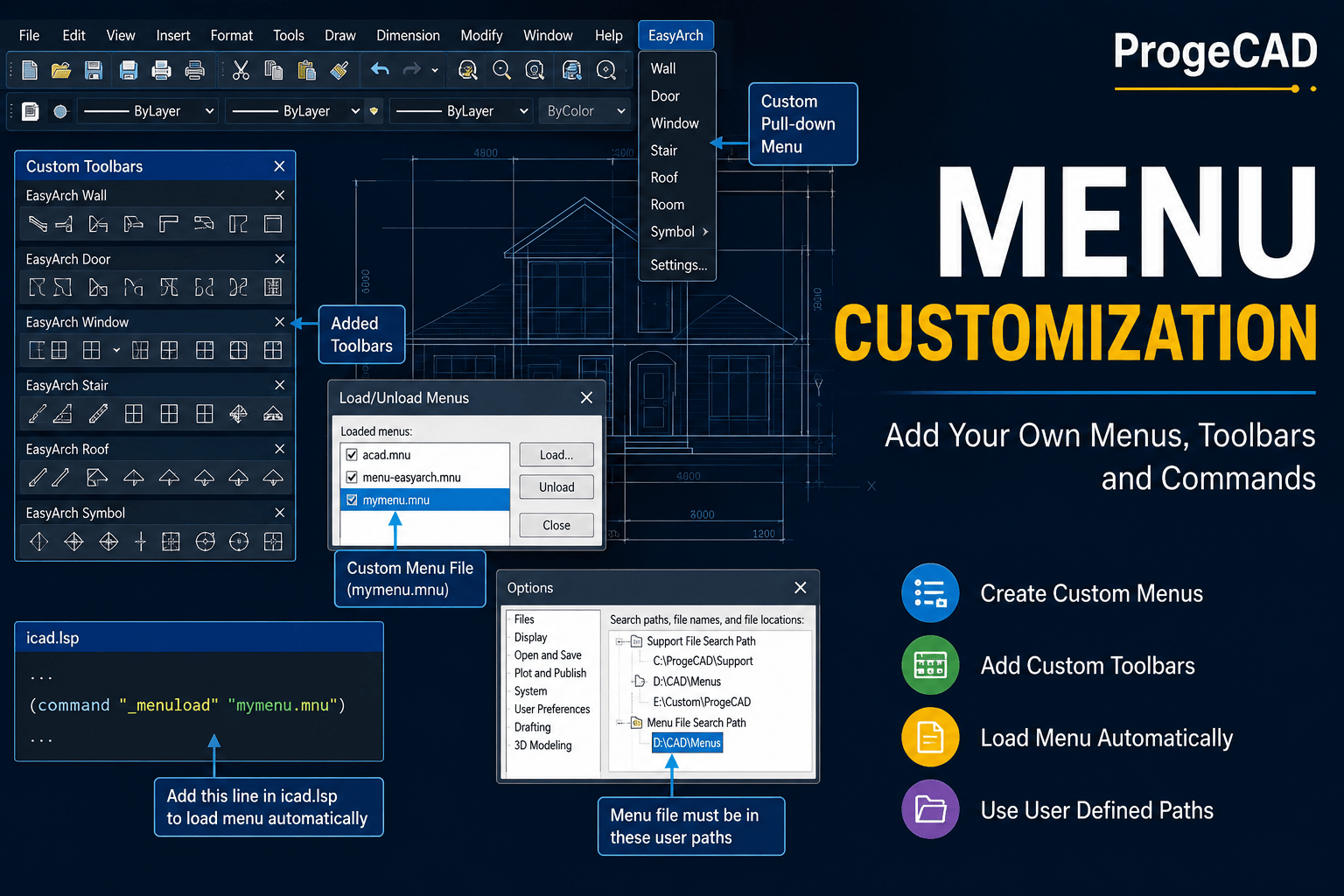
How to Customize Menus and Toolbars in ProgeCAD
ProgeCAD allows users to customize the interface by adding their own menus and toolbars. Instead of replacing the default interface, the recommended approach is to load partial menu files. This keeps the standard ProgeCAD environment intact while allowing you to add custom commands, toolbars, and pull-down menus.
Using Partial Menu Files
A partial menu file lets you extend the existing interface without modifying the default menu configuration. This is the safest and easiest method for adding your own CAD tools.
One example is the menu-easyarch.mnu file, which includes:
- One custom pull-down menu named EasyArch.
- Six additional toolbars.
- Custom commands for architectural drafting.
Automatically Load a Custom Menu
If you create your own menu file (for example, mymenu.mnu), you can configure ProgeCAD to load it automatically each time the software starts.
Edit the icad.lsp file and add the following line:
(command "_menuload" "mymenu.mnu")
When ProgeCAD starts, it will automatically load your custom menu file.
Store the Menu File in the Correct Location
Save your custom menu file in one of the folders listed under:
Tools > Options > Paths / Files
If the file is not located in one of these folders, ProgeCAD will not be able to load it automatically during startup.
Benefits of Menu Customization
- Add frequently used commands to custom toolbars.
- Create company-specific pull-down menus.
- Improve drafting productivity.
- Organize CAD tools for different teams.
- Automate repetitive tasks using custom commands.
- Keep the default ProgeCAD interface unchanged while extending functionality.
Need Help Customizing ProgeCAD?
Murari Software Solutions provides expert support for ProgeCAD customization, including custom menus, toolbars, AutoLISP development, installation, licensing, and workflow optimization. Contact our team if you need assistance creating or deploying customized ProgeCAD environments.